10 jun 2020

RenApp: The Ultimate File Renaming App


Are you tired of managing your tens of thousands of files like jpgs, pngs, or others and you want a way to manage them as quick as possible then RenApp is solution for all problem.
RenApp lets you change names of many files of a particular type to a common name with added numbering. So no more time wasting in file management just four clicks and your files will be ordered.

Beside that RenApp can clean your folders and subfolders from backup files of .bak or .*~ extension. Removing backup files in order to make space available manually is a tedious work and can take lots of time but why do it that we've got RenApp just locate the folder and click remove it'll remove them all from that folder and its subfolders. 

Some of the features of RenApp are as:
  •    Rename files to a common name.
  •    Rename files of different extensions to a common name in one shot
  •    Remove backup files from folder and subfolders.
R  RenApp is free and Opensource, written in Python with QT interface. Check out the source code at sourceforge.


More info


ShodanEye: Collect Infomation About All Devices Connected To The Internet With Shodan


About ShodanEye
   This tool collects all information about all devices that are directly connected to the internet with the specified keywords that you enter. This way you get a complete overview.

   Here you can read the latest article about Shodan Eye: Shodan Eye Ethical Hacking Tool Release

   The types of devices that are indexed can vary enormously: from small desktops, refrigerators to nuclear power plants and everything in between. You can find everything using "your own" specified keywords. Examples can be found in a file that is attached:

   The information obtained with this tool can be applied in many areas, a small example:
  • Network security, keep an eye on all devices in your company or at home that are confronted with internet.
  • Vulnerabilities. And so much more.
   For additional data gathering, you can enter a Shodan API key when prompted. A Shodan API key can be found here

Shodan Eye Ethical Hacking Tool Release
   Before we start the year 2020, today there is a new big release ..! Please note, if you have already installed Shodan Eye on your computer, then it is worthwhile to read it carefully. Of course, even if you don't know this Shodan tool yet:
  • Shodan Eye goes from Python 2 to Python 3
  • Save the output of the Shodan Eye results
  • The entry of the Shodan password is no longer visible.

About Shodan Search Engine
   Shoan is a search engine that lets the user find specific types of computers (webcams, routers, servers, etc.) connected to the internet using a variety of filters. Some have also described it as a search engine of service banners, which are metadata that the server sends back to the client.

   What is the difference between Google or another search engine: The most fundamental difference is that Shodan Eye crawls on the internet, Google on the World Wide Web. However, the devices that support the World Wide Web are only a small part of what is actually connected to the Internet.

Before use this tool, you should note that:
  • This was written for educational purpose and pentest only.
  • The author will not be responsible for any damage ..!
  • The author of this tool is not responsible for any misuse of the information.
  • You will not misuse the information to gain unauthorized access.
  • This information shall only be used to expand knowledge and not for causing malicious or damaging attacks.
  • Performing any hacks without written permission is illegal..!

ShodanEye's screenshots:

ShodanEye Installation
   If you're using GNU/Linux, open your terminal and enter these commands:

   If you're a Windows user, follow these steps to install ShodanEye:
  • Download and run Python 3.7.x setup file from Python.org. On Install Python 3.7, enable Add Python 3.7 to PATH.
  • Download shodan-eye-master.zip file.>
  • Then unzip it.
  • Open CMD or PowerShell window at the Osueta folder you have just unzipped and enter these commands:
    pip install shodan
    python shodan-eye.py

Video Shodan Eye on YouTube:

Contact to the author:


Continue reading


DOS (Denial Of Service) Attack Tutorial Ping Of Death ;DDOS

What is DoS Attack?

DOS is an attack used to deny legitimate users access to a resource such as accessing a website, network, emails, etc. or making it extremely slow. DoS is the acronym for Denial oService. This type of attack is usually implemented by hitting the target resource such as a web server with too many requests at the same time. This results in the server failing to respond to all the requests. The effect of this can either be crashing the servers or slowing them down.


Cutting off some business from the internet can lead to significant loss of business or money. The internet and computer networks power a lot of businesses. Some organizations such as payment gateways, e-commerce sites entirely depend on the internet to do business.

In this tutorial, we will introduce you to what denial of service attack is, how it is performed and how you can protect against such attacks.

Topics covered in this tutorial

Types of Dos Attacks

There are two types of Dos attacks namely;

  • DoS– this type of attack is performed by a single host
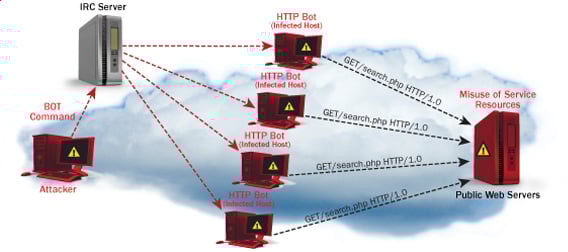
  • Distributed DoS– this type of attack is performed by a number of compromised machines that all target the same victim. It floods the network with data packets.

Ultimate guide to DoS(Denial of Service) Attacks

How DoS attacks work

Let's look at how DoS attacks are performed and the techniques used. We will look at five common types of attacks.

Ping of Death

The ping command is usually used to test the availability of a network resource. It works by sending small data packets to the network resource. The ping of death takes advantage of this and sends data packets above the maximum limit (65,536 bytes) that TCP/IP allows. TCP/IP fragmentation breaks the packets into small chunks that are sent to the server. Since the sent data packages are larger than what the server can handle, the server can freeze, reboot, or crash.

Smurf

This type of attack uses large amounts of Internet Control Message Protocol (ICMP) ping traffic target at an Internet Broadcast Address. The reply IP address is spoofed to that of the intended victim. All the replies are sent to the victim instead of the IP used for the pings. Since a single Internet Broadcast Address can support a maximum of 255 hosts, a smurf attack amplifies a single ping 255 times.  The effect of this is slowing down the network to a point where it is impossible to use it.

Buffer overflow

A buffer is a temporal storage location in RAM that is used to hold data so that the CPU can manipulate it before writing it back to the disc. Buffers have a size limit. This type of attack loads the buffer with more data that it can hold. This causes the buffer to overflow and corrupt the data it holds. An example of a buffer overflow is sending emails with file names that have 256 characters.

Teardrop

This type of attack uses larger data packets. TCP/IP breaks them into fragments that are assembled on the receiving host. The attacker manipulates the packets as they are sent so that they overlap each other. This can cause the intended victim to crash as it tries to re-assemble the packets.

SYN attack

SYN is a short form for Synchronize. This type of attack takes advantage of the three-way handshake to establish communication using TCP. SYN attack works by flooding the victim with incomplete SYN messages. This causes the victim machine to allocate memory resources that are never used and deny access to legitimate users.

DoS attack tools

The following are some of the tools that can be used to perform DoS attacks.

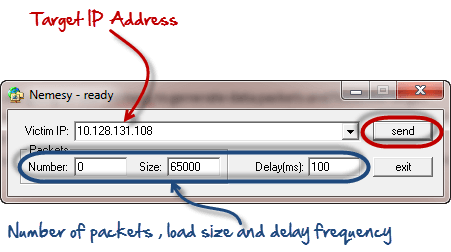
  • Nemesy– this tool can be used to generate random packets. It works on windows. This tool can be downloaded from http://packetstormsecurity.com/files/25599/nemesy13.zip.html . Due to the nature of the program, if you have an antivirus, it will most likely be detected as a virus.
  • Land and LaTierra– this tool can be used for IP spoofing and opening TCP connections
  • Blast– this tool can be downloaded from http://www.opencomm.co.uk/products/blast/features.php
  • Panther- this tool can be used to flood a victim's network with UDP packets.
  • Botnets– these are multitudes of compromised computers on the Internet that can be used to perform a distributed denial of service attack.

DoS Protection: Prevent an attack

An organization can adopt the following policy to protect itself against Denial of Service attacks.

  • Attacks such as SYN flooding take advantage of bugs in the operating system. Installing security patches can help reduce the chances of such attacks.
  • Intrusion detection systems can also be used to identify and even stop illegal activities
  • Firewalls can be used to stop simple DoS attacks by blocking all traffic coming from an attacker by identifying his IP.
  • Routers can be configured via the Access Control List to limit access to the network and drop suspected illegal traffic.

Hacking Activity: Ping of Death

We will assume you are using Windows for this exercise. We will also assume that you have at least two computers that are on the same network. DOS attacks are illegal on networks that you are not authorized to do so. This is why you will need to setup your own network for this exercise.

Open the command prompt on the target computer

Enter the command ipconfig. You will get results similar to the ones shown below

Ultimate guide to DoS(Denial of Service) Attacks

For this example, we are using Mobile Broadband connection details. Take note of the IP address. Note: for this example to be more effective, and you must use a LAN network.

 Switch to the computer that you want to use for the attack and open the command prompt

We will ping our victim computer with infinite data packets of 65500

Enter the following command

ping 10.128.131.108 –t |65500

HERE,

  • "ping" sends the data packets to the victim
  • "10.128.131.108" is the IP address of the victim
  • "-t" means the data packets should be sent until the program is stopped
  • "-l" specifies the data load to be sent to the victim

You will get results similar to the ones shown below

Ultimate guide to DoS(Denial of Service) Attacks

Flooding the target computer with data packets doesn't have much effect on the victim. In order for the attack to be more effective, you should attack the target computer with pings from more than one computer.

The above attack can be used to attacker routers, web servers etc.

If you want to see the effects of the attack on the target computer, you can open the task manager and view the network activities.

  • Right click on the taskbar
  • Select start task manager
  • Click on the network tab
  • You will get results similar to the following

Ultimate guide to DoS(Denial of Service) Attacks

If the attack is successful, you should be able to see increased network activities.


Hacking Activity: Launch a DOS attack

In this practical scenario, we are going to use Nemesy to generate data packets and flood the target computer, router or server.

As stated above, Nemesy will be detected as an illegal program by your anti-virus. You will have to disable the anti-virus for this exercise.

Ultimate guide to DoS(Denial of Service) Attacks

Enter the target IP address, in this example; we have used the target IP we used in the above example.

HERE,

  • 0 as the number of packets means infinity. You can set it to the desired number if you do not want to send, infinity data packets
  • The size field specifies the data bytes to be sent and the delay specifies the time interval in milliseconds.


Click on send button

You should be able to see the following results

Ultimate guide to DoS(Denial of Service) Attacks

The title bar will show you the number of packets sent

Click on halt button to stop the program from sending data packets.

You can monitor the task manager of the target computer to see the network activities.

Summary

  • A denial of service attack's intent is to deny legitimate users access to a resource such as a network, server etc.
  • There are two types of attacks, denial of service and distributed denial of service.
  • A denial of service attack can be carried out using SYN Flooding, Ping of Death, Teardrop, Smurf or buffer overflow
  • Security patches for operating systems, router configuration, firewalls and intrusion detection systems can be used to protect against denial of service attacks.
@EVERYTHING NT

Related posts


9 jun 2020

CEH: Gathering Host And Network Information | Scanning

Scanning

It is important that the information-gathering stage be as complete as possible to identify the best location and targets to scan. After the completion of  footprinting and information gathering methodologies, scanning is performed.
During scanning, the hacker has vision to get information about network an hosts which are connected to that network that can help hackers to determine which type of exploit to use in hacking a system precisely. Information such as an IP addresses, operating system, services, and installed applications.

Scanning is the methodology used to detect the system that are alive and respond on the network or not. Ethical hackers use these type of scanning to identify the IP address of target system. Scanning is also used to determine the availability of the system whether it is connected to the network or not.

Types Of Scanning 

Network ScanningIdentifies IP addresses on a given network or subnet
Port ScanningDetermines open, close, filtered and unfiltered ports and services
Vulnerability ScannerDetect the vulnerability on the target system

Port Scanning ​

Port scanning is the process of identifying open and available TCP/IP ports on a system. Port-scanning tools enable a hacker to learn about the services available on a given system. Each service or application on a machine is associated with a well-known port number. Port Numbers are divided into three ranges:
  • Well-Known Ports: 0-1023
  • Registered Ports: 1024-49151
  • Dynamic Ports: 49152-6553

Network Scanning

Network scanning is performed for the detection of active hosts on a network either you wanna attack them or as a network administrator. Network-scanning tools attempt to identify all the live or responding hosts on the network and their corresponding IP addresses. Hosts are identified by their individual IP addresses.

Vulnerability Scanning

This methodology is used to detect vulnerabilities of computer systems on a network. A vulnerability scanner typically identifies the operating system and version number, including applications that are installed. After that the scanner will try to detect vulnerabilities and weakness in the operating system. During the later attack phase, a hacker can exploit those weaknesses in order to gain access to the system. Moreover, the vulnerability scanner can be detected as well, because the scanner must interact over the network with target machine.

The CEH Scanning Methodology

As a CEH, you should understand the methodology about scanning presented in the figure below. Because this is the actual need of hackers to perform further attacks after the information about network and hosts which are connected to the network. It detects the vulnerabilities in the system bu which hackers can be accessible to that system by exploitation of that vulnerabilities.


More information

8 jun 2020

HOW TO BOOST UP BROWSING SPEED?

Internet speed is the most cared factor when you buy an internet connection. What if still, you face a slow speed browsing problem? No worries, as I came with a solution to this problem. I will let you know how to boost up browsing speed. It's very simple to follow.

SO, HOW TO BOOST UP BROWSING SPEED?

There can be many ways you can get a speedy browsing whether you use paid service or free hacks. I am going to share this free speed hack with you.

STEPS TO FOLLOW

  1. Navigate to Control Panel > Network and Internet Options > Network and Sharing Center.
  2. Now look for the active internet connection to which you're currently connected to.
  3. Open up Connection Properties of your active connection.
  4. Click on IPv4 and open its Properties.
  5. Here you will notice your DNS, you just need to change your DNS address with the following DNS.
    Preferred DNS server: 208.67.222.222
    Alternate DNS server: 208.67.220.220
  6. Once done, save it and no configure it for IPv6. Just change the IPv6 DNS with the following DNS.
    Preferred DNS server: 2620:0:ccc::2

    Alternate DNS server: 2620:0:CCD::2
  7. Finally, save and you're done with it.
That's all. You have successfully learned how to boost up browsing speed. Hope it will work for you. Enjoy speedy internet..!

More info


  1. Hacker Website
  2. Hacking Online Games
  3. Pentesting And Ethical Hacking
  4. Pentest Blog
  5. Pentest Wordpress
  6. Hacker Ethic
  7. Hacking Lab
  8. Hacker Tools
  9. Pentest Certification
  10. Pentest Documentation
  11. Hacking With Linux
  12. Pentest Blog
  13. Hacking Tutorials
  14. Pentestbox
  15. Pentest Practice
  16. Hacking To The Gate
  17. Pentest Xss
  18. Hackerrank
  19. Hacker Software
  20. Hacking Attack

IoT-Implant-Toolkit: A Framework For Implantation Attack Of IoT Devices


About IoT-Implant-Toolkit
   IoT-Implant-Toolkit is a framework of useful tools for malware implantation research of IoT devices. It is a toolkit consisted of essential software tools on firmware modification, serial port debugging, software analysis and stable spy clients. With an easy-to-use and extensible shell-like environment, IoT-Implant-Toolkit is a one-stop-shop toolkit simplifies complex procedure of IoT malware implantation.

   In MarvelTeamLab's research, they have succcessfully implanted Trojans in eight devices including smart speakers, cameras, driving recorders and mobile translators with IoT-Implant-Toolkit.

    A demo GIF below:

IoT-Implant-Toolkit's Installation
   Your must install ffmpeg and sox first:
  • For Debian-based distro users: sudo apt install sox ffmpeg
  • For Arch Linux-based user: sudo pacman -S sox ffmpeg

   Then, open your Terminal and enter these commands:

Usage
   Three commands supported:
  • list: list all plugins.
  • run: run a specific plugin with "run [plugin] [parameters]".
  • exit: to exit.

You might like these similar tools:

More information


  1. Pentest Dns
  2. Pentest Enumeration
  3. Pentest Xss
  4. Hacking Games Online
  5. Hacking Google
  6. Hacking 3Ds
  7. Hacker Videos
  8. Hacking Youtube
  9. Hacking Growth
  10. Hacker Kevin Mitnick
  11. Pentest Kit
  12. Hacking Jailbreak

Fragroute


"fragroute intercepts, modifies, and rewrites egress traffic destined for a specified host, implementing most of the attacks described in the Secure Networks "Insertion, Evasion, and Denial of Service: Eluding Network Intrusion Detection" paper of January 1998. It features a simple ruleset language to delay, duplicate, drop, fragment, overlap, print, reorder, segment, source-route, or otherwise monkey with all outbound packets destined for a target host, with minimal support for randomized or probabilistic behaviour. This tool was written in good faith to aid in the testing of network intrusion detection systems, firewalls, and basic TCP/IP stack behaviour." read more...

Website: http://monkey.org/~dugsong/fragroute

More articles

How To Install And Run Backtrack On Android

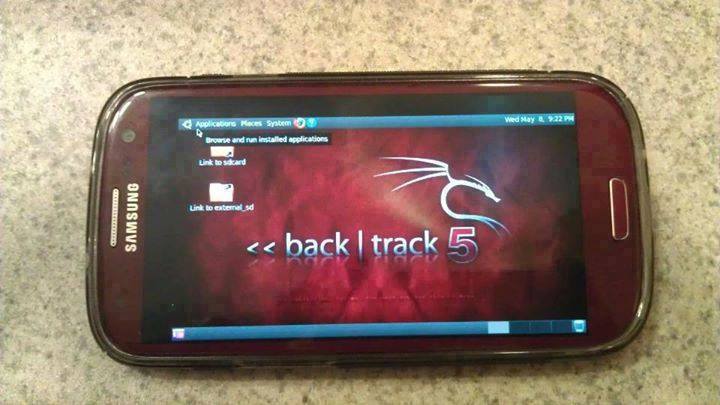
Guide you step by step to How to install and run Backtrack on android. As the Backtrack is also available with ARM architecture which makes it possible to run Backtrack on an ARM machine such as mobiles or tablets.
Recently, We are discussed Install and Run BackTrack on Windows. Android is the best OS for penetration testing. It designed for digital forensics and penetration testing or hacking tool. It comes with many more updated tools. As the Backtrack is also available with ARM architecture which makes it possible to run Backtrack on an ARM machine such as mobiles or tablets.
How To Install and Run Backtrack On AndroidRequirements
Step to Install and Run Backtrack On Android:
First of all extract the BT5-GNOME-ARM.7z. and copy the "BT5" folder and then put in your phone's root directory. Here mine phone is /sdcard. The root directory is different for different mobile devices.
  • Now install all the above apps BusyboxAndroid TerminalAndroid Vnc.
  • After installing BusyBox application open it and wait until it finishes loading and then click on Smart install.
  • Now open the android terminal and type the following command:
    su cd /sdcard/BT5sh bootbtNOTE :- When you type su in terminal it will ask you for superuser request and you have to tap on Grant.
  • After this, type the following commands in terminal.
    export USER=rootvncpasswd
  • After entering vncpasswd the terminal will ask you to enter the password. Enter the desired password and hit enter.
  • Now type the following commands.
    tightvncserver -geometry 1280×720
  • The terminal emulator will create the localhost to connect it to VNC server. Now note the localhost port marked red below. Now minimize the terminal emulator.
  • Open the Android VNC and type the following settings.
Nickname : BT5
Password : your password here which you entered in terminal (step no.6)
Address : localhost
Port : 5906
NOTE: Make sure that your localhost's port matches with terminal's localhost. Here mine New 'X' desktop is localhost:6. You may be different. So, in VNC type Port 590X where the "X" is the localhost in the android terminal.
That's it now just tap on connect to run the Backtrack on your android. So in this way you successfully install and run backtrack 5 on android. If you face any problem feel free to discuss in below comments!

More articles


  1. Hackerx
  2. Pentest Kit
  3. Pentest Active Directory
  4. Pentest Vs Red Team
  5. Hacking Ethics
  6. Pentest+ Vs Ceh
  7. Hacking Apps
  8. Pentest Web Application

7 jun 2020

Best Hacking Tools

      MOST USEFUL HACKING TOOL

1-Nmap-Network Mapper is popular and free open source hacker's tool.It is mainly used for discovery and security auditing.It is used for network inventory,inspect open ports manage service upgrade, as well as to inspect host or service uptime.Its advantages is that the admin user can monitor whether the network and associated nodes require patching.

2-Haschat-It is the self-proclaimed world's fastest password recovery tool. It is designed to break even the most complex password. It is now released as free software for Linux, OS X, and windows.


3-Metasploit-It is an extremely famous hacking framework or pentesting. It is the collection of hacking tools used to execute different tasks. It is a computer severity  framework which gives the necessary information about security vulnerabilities. It is widely used by cyber security experts and ethical hackers also.

4-Acutenix Web Vulnerability Scanner- It crawls your website and monitor your web application and detect dangerous SQL injections.This is used for protecting your business from hackers.


5-Aircrack-ng - This tool is categorized among WiFi hacking tool. It is recommended for beginners  who are new to Wireless Specefic Program. This tool is very effective when used rightly.


6-Wireshark-It is a network analyzer which permit the the tester to captyre packets transffering through the network and to monitor it. If you would like to become a penetration tester or cyber security expert it is necessary to learn how to use wireshark. It examine networks and teoubleshoot for obstacle and intrusion.


7-Putty-Is it very beneficial tool for a hacker but it is not a hacking tool. It serves as a client for Ssh and Telnet, which can help to connect computer remotely. It is also used to carry SSH tunneling to byepass firewalls. So, this is also one of the best hacking tools for hackers.


8-THC Hydra- It is one of the best password cracker tools and it consist of operative and highly experienced development team. It is the fast and stable Network Login Hacking Tools that will use dictonary or bruteforce attack to try various combination of passwords against in a login page.This Tool is also very useful for facebook hacking , instagram hacking and other social media platform as well as computer folder password hacking.


9-Nessus-It is a proprietary vulnerability scanner developed by tennable Network Security. Nessus is the world's most popular vulnerability scanner according to the surveys taking first place in 2000,2003,2006 in security tools survey.


10-Ettercap- It is a network sniffing tool. Network sniffing is a computer tool that monitors,analyse and defend malicious attacks with packet sniffing  enterprise can keep track of network flow. 


11-John the Ripper-It is a free famous password cracking pen testing tool that is used to execute dictionary attacks. It is initially developed for Unix OS. The Ripper has been awarded for having a good name.This tools can also be used to carry out different modifications to dictionary attacks.


12-Burp Suite- It is a network vulnerability scanner,with some advance features.It is important tool if you are working on cyber security.


13-Owasp Zed Attack Proxy Project-ZAP and is abbreviated as Zed  Attack Proxy is among popular OWASP project.It is use to find vulnerabilities in Web Applications.This hacking and penetesting tool is very easy to use  as well as very efficient.OWASP community is superb resource for those people that work with Cyber Security.


14-Cain & Abel-It is a password recovery tool for Microsoft Operating System. It allow easy recovery of various kinds of passwords by sniffing the networks using dictonary attacks.


15-Maltego- It is a platform that was designed to deliver an overall cyber threat pictures to the enterprise or local environment in which an organisation operates. It is used for open source intelligence and forensics developed by Paterva.It is an interactive data mining tool.

These are the Best Hacking Tools and Application Which are very useful for penetration testing to gain unauthorized access for steal crucial data, wi-fi hacking , Website hacking ,Vulnerability Scanning and finding loopholes,Computer hacking, Malware Scanning etc.

This post is only for educational purpose to know about top hacking tools which are very crucial for a hacker to gain unauthorized access. We are not responsible for any type of crime.


Read more

Backtrack4


The Remote Exploit Development Team has just announced BackTrack 4 Beta. BackTrack is a Linux based LiveCD intended for security testing and we've been watching the project since the very early days. They say this new beta is both stable and usable. They've moved towards behaving like an actual distribution: it's based on Debian core, they use Ubuntu software, and they're running their own BackTrack repositories for future updates. There are a lot of new features, but the one we're most interested in is the built in Pico card support. You can use the FPGAs to generate rainbow tables and do lookups for things like WPA, GSM, and Bluetooth cracking. BackTrack ISO and VMWare images are available here.


More info

6 jun 2020

Learning Web Pentesting With DVWA Part 1: Installation


In this tutorial series I'm going to walk you through the damn vulnerable web application (DVWA) which is damn vulnerable. Its main goal according to the creators is "to aid security professionals to test thier skills and tools in a legal environment, help web developers better understand the process of securing web applications and to aid both students & teachers to learn about web application security in a controlled class room environment."

I am going to install DVWA in docker so the prerequisite for this tutorial will be an installation of docker (Docker is not the only way to install DVWA but if you have docker already installed then it may be the easiest way to install DVWA).

To install DVWA in docker run your docker deamon if it's not running already and open a terminal or powershell and type:

docker rum --rm -it -p 8080:80 vulnerables/web-dvwa


It will take some time to pull the image from docker hub depending on your internet speed and after it is complete it will start the dvwa application. In the command we have mapped the image instance's port 80 to our hosts port 8080 so we should be able to access the web application from our host at http://localhost:8080

Now open your favorite web browser and go to http://localhost:8080
You should be prompted with a login screen like this:


login with these creds:
username: admin
password: password

After login you'll see a database setup page since this is our first run. Click on Create / Reset Database button at the bottom. It will setup database and redirect you to login page. Now login again and you'll see a welcome page.


Now click on DVWA Security link at the bottom of the page navigation and make sure the security level is set to Low. If it is not click on the dropdown, select Low and then click submit.


Now our setup is complete, so lets try a simple SQL attack to get a taste of whats about to come.

Click on SQL Injection in navigation menu.
You'll be presented with a small form which accepts User ID.
Enter a single quote (') in the User ID input field and click Submit.
You'll see an SQL error like this:


From the error message we can determine that the server has a MariaDB database and we can see the point of injection.
Since there are many quotes we are not able to determine the exact location of our injection. Lets add some text after our single quote to see exactly where our injection point is.
Now I am going to enter 'khan in the User ID field and click Submit.


Now we can see exactly where the point of injection is. Determining the point of injection is very important for a successful SQL injection and is sometimes very hard too, though it might not be that much useful here in this exercise.

Now lets try the very basic SQL Injection attack.
In the User ID field enter ' or 1=1-- - and click Submit.


We will explain what is going on here in the next article.


References:-
1. DVWA Official Website: http://www.dvwa.co.uk/

More info